The QPixmap 類是可以用作描繪設備的離屏圖像錶示。 更多...
| 頭: | #include <QPixmap> |
| qmake: | QT += gui |
| 繼承: | QPaintDevice |
| 繼承者: | QBitmap |
| QPixmap () | |
| QPixmap (int width , int height ) | |
| QPixmap (const QSize & size ) | |
| QPixmap (const QString & fileName , const char * format = nullptr, Qt::ImageConversionFlags flags = Qt::AutoColor) | |
| QPixmap (const char *const [] xpm ) | |
| QPixmap (const QPixmap & pixmap ) | |
| virtual | ~QPixmap () |
| QPixmap | alphaChannel () const |
| qint64 | cacheKey () const |
| bool | convertFromImage (const QImage & image , Qt::ImageConversionFlags flags = Qt::AutoColor) |
| QPixmap | copy (const QRect & rectangle = QRect()) const |
| QPixmap | copy (int x , int y , int width , int height ) const |
| QBitmap | createHeuristicMask (bool clipTight = true) const |
| QBitmap | createMaskFromColor (const QColor & maskColor , Qt::MaskMode mode = Qt::MaskInColor) const |
| int | depth () const |
| void | detach () |
| qreal | devicePixelRatio () const |
| void | fill (const QColor & color = Qt::white) |
| bool | hasAlpha () const |
| bool | hasAlphaChannel () const |
| int | height () const |
| bool | isNull () const |
| bool | isQBitmap () const |
| bool | load (const QString & fileName , const char * format = nullptr, Qt::ImageConversionFlags flags = Qt::AutoColor) |
| bool | loadFromData (const uchar * data , uint len , const char * format = nullptr, Qt::ImageConversionFlags flags = Qt::AutoColor) |
| bool | loadFromData (const QByteArray & data , const char * format = nullptr, Qt::ImageConversionFlags flags = Qt::AutoColor) |
| QBitmap | mask () const |
| QRect | rect () const |
| bool | save (const QString & fileName , const char * format = nullptr, int quality = -1) const |
| bool | save (QIODevice * device , const char * format = nullptr, int quality = -1) const |
| QPixmap | scaled (const QSize & size , Qt::AspectRatioMode aspectRatioMode = Qt::IgnoreAspectRatio, Qt::TransformationMode transformMode = Qt::FastTransformation) const |
| QPixmap | scaled (int width , int height , Qt::AspectRatioMode aspectRatioMode = Qt::IgnoreAspectRatio, Qt::TransformationMode transformMode = Qt::FastTransformation) const |
| QPixmap | scaledToHeight (int height , Qt::TransformationMode mode = Qt::FastTransformation) const |
| QPixmap | scaledToWidth (int width , Qt::TransformationMode mode = Qt::FastTransformation) const |
| void | scroll (int dx , int dy , int x , int y , int width , int height , QRegion * exposed = nullptr) |
| void | scroll (int dx , int dy , const QRect & rect , QRegion * exposed = nullptr) |
| void | setAlphaChannel (const QPixmap & p ) |
| void | setDevicePixelRatio (qreal scaleFactor ) |
| void | setMask (const QBitmap & mask ) |
| QSize | size () const |
| void | swap (QPixmap & other ) |
| QImage | toImage () const |
| QPixmap | transformed (const QTransform & transform , Qt::TransformationMode mode = Qt::FastTransformation) const |
| QPixmap | transformed (const QMatrix & matrix , Qt::TransformationMode mode = Qt::FastTransformation) const |
| int | width () const |
| QVariant | operator QVariant () const |
| bool | operator! () const |
| QPixmap & | operator= (const QPixmap & pixmap ) |
| QPixmap & | operator= (QPixmap && other ) |
| int | defaultDepth () |
| QPixmap | fromImage (const QImage & image , Qt::ImageConversionFlags flags = Qt::AutoColor) |
| QPixmap | fromImage (QImage && image , Qt::ImageConversionFlags flags = Qt::AutoColor) |
| QPixmap | fromImageReader (QImageReader * imageReader , Qt::ImageConversionFlags flags = Qt::AutoColor) |
| QTransform | trueMatrix (const QTransform & matrix , int width , int height ) |
| QMatrix | trueMatrix (const QMatrix & m , int w , int h ) |
| QDataStream & | operator<< (QDataStream & stream , const QPixmap & pixmap ) |
| QDataStream & | operator>> (QDataStream & stream , QPixmap & pixmap ) |
The QPixmap 類是可以用作描繪設備的離屏圖像錶示。
Qt 為處理圖像數據提供瞭 4 個類:
QImage
,
QPixmap
,
QBitmap
and
QPicture
.
QImage
是為 I/O 和直接訪問/操縱像素而設計並優化的,而
QPixmap
是為在屏幕上展示圖像而設計並優化的。
QBitmap
隻是方便類,繼承
QPixmap
,確保 1 深度。
isQBitmap
() 函數返迴
true
若
QPixmap
對象確實是位圖,否則返迴
false
。最後,
QPicture
類是描繪設備,它記錄並重演
QPainter
命令。
A QPixmap 可以輕鬆顯示在屏幕上使用 QLabel 或某一 QAbstractButton 子類 (譬如 QPushButton and QToolButton ). QLabel 擁有 pixmap 屬性,而 QAbstractButton 擁有 icon 特性。
QPixmap 對象可以按值圍繞傳遞由於 QPixmap 類使用隱式數據共享。更多信息,見 隱式數據共享 文檔編製。 QPixmap 對象還可以被流化。
注意,像素圖中的像素數據在內部,且由底層窗口係統管理。因為 QPixmap 是 QPaintDevice 子類, QPainter 可以用於在像素圖中直接繪製。隻可以訪問像素透過 QPainter 函數或通過轉換 QPixmap 到 QImage 。不管怎樣, fill () 函數是可用的為采用給定顔色初始化整個像素圖。
有函數能轉換 QImage and QPixmap 。通常, QImage 類用於加載圖像文件,可選操縱圖像數據,先於 QImage 對象被轉換成 QPixmap 以展示在屏幕中。另外,若不期望操縱,可以直接將圖像文件加載進 QPixmap .
QPixmap 提供可以用於獲取像素圖各種有關信息的一批函數。此外,還有幾個函數啓用像素圖變換。
QPixmap 提供瞭幾種讀取圖像文件的方式:可以加載文件當構造 QPixmap 對象,或通過使用 load () 或 loadFromData () 函數稍後。當加載圖像時,文件名可以引用實際磁盤文件,或引用應用程序的某一嵌入資源。見 Qt 資源係統 概述,瞭解如何在應用程序可執行文件中嵌入圖像及其它資源文件的細節。
隻需調用 save () 函數以保存 QPixmap 對象。
可獲得支持的文件格式的完整列錶,透過 QImageReader::supportedImageFormats () 和 QImageWriter::supportedImageFormats () 函數。可以將新文件格式添加作為插件。默認情況下,Qt 支持以下格式:
| 格式 | 描述 | Qt 支持 |
|---|---|---|
| BMP | Windows 位圖 | 讀/寫 |
| GIF | GIF (圖形互換格式) 可選 | 讀取 |
| JPG | JPEG (聯閤攝影專傢組) | 讀/寫 |
| JPEG | JPEG (聯閤攝影專傢組) | 讀/寫 |
| PNG | PNG (便攜式網絡圖形) | 讀/寫 |
| PBM | PBM (便攜式位圖) | 讀取 |
| PGM | PGM (便攜式灰度圖) | 讀取 |
| PPM | Portable Pixmap (便攜式像素圖) | 讀/寫 |
| XBM | X11 Bitmap (X11 位圖) | 讀/寫 |
| XPM | X11 Pixmap (X11 像素圖) | 讀/寫 |
QPixmap 提供瞭可用於獲得像素圖各種有關信息的一批函數:
| 可用函數 | |
|---|---|
| 幾何體 | The size (), width () 和 height () 函數提供像素圖大小的有關信息。 rect () 函數返迴圖像的封閉矩形。 |
| Alpha 組件 |
The
hasAlphaChannel
() 返迴
true
若像素圖是遵守 Alpha 通道的格式,否則返迴
false
。
hasAlpha
(),
setMask
() 和
mask
() 函數是傳統的且不應使用。它們潛在非常慢。
The createHeuristicMask () 函數創建並返迴 1-bpp 試探遮罩 (即 QBitmap ) 對於此像素圖。它的工作是通過從一角選擇顔色,然後從所有邊緣開始去除相應顔色的像素。 createMaskFromColor () 函數創建並返迴遮罩 (即 QBitmap ) 對於基於給定顔色的像素圖而言。 |
| 低級信息 |
The
depth
() 函數返迴像素圖的深度。
defaultDepth
() 函數返迴默認深度 (即:應用程序在給定屏幕上所使用的深度)。
The cacheKey () 函數返迴內容的唯一標識數為 QPixmap 對象。 x11Info() 函數返迴像素圖目前所屬屏幕,所用 X 顯示的有關配置信息。x11PictureHandle() 函數返迴支持 XRender 像素圖的 X11 圖片句柄。注意,後 2 函數隻可用於 x11。 |
A QPixmap 對象可以被轉換成 QImage 使用 toImage () 函數。同樣, QImage 可以被轉換成 QPixmap 使用 fromImage ()。若操作過於昂貴,可以使用 QBitmap::fromImage () 代替。
要轉換 QPixmap to and from HICON you can use the QtWinExtras functions QtWin::toHICON() and QtWin::fromHICON() respectively.
QPixmap 支持用於創建新像素圖 (是原始像素圖的變換版本) 的許多函數:
The scaled (), scaledToWidth () 和 scaledToHeight () 函數返迴像素圖的比例縮放副本,而 copy () 函數創建 QPixmap 是原始的純副本。
The transformed () 函數返迴按給定變換矩陣和變換模式變換的像素圖副本:在內部,調節變換矩陣以補償不想要的平移,即 transformed () 返迴包含原始像素圖所有變換點的最小像素圖。靜態 trueMatrix () 函數返迴用於變換像素圖的實際矩陣。
注意: 當使用本機 X11 圖形係統時,像素圖變為無效當 QApplication 實例被銷毀。
另請參閱 QBitmap , QImage , QImageReader ,和 QImageWriter .
構造 null 像素圖。
另請參閱 isNull ().
構造像素圖采用給定 width and height 。若 width or height 為 0,構造 null 像素圖。
警告: 這將創建 QPixmap 采用未初始化數據。調用 fill () 以閤適顔色填充像素圖先於繪製采用 QPainter .
另請參閱 isNull ().
這是重載函數。
構造像素圖為給定 size .
警告: 這將創建 QPixmap 采用未初始化數據。調用 fill () 以閤適顔色填充像素圖先於繪製采用 QPainter .
從文件構造像素圖采用給定 fileName 。若文件不存在 (或格式未知),像素圖變為 null 像素圖。
加載器試圖讀取像素圖使用指定 format 。若 format 未指定 (默認),加載器會探針文件 Header (頭) 以猜測文件格式。
文件名可以引用實際磁盤文件,或引用應用程序的某一嵌入資源。見 資源係統 概述,瞭解如何在應用程序可執行文件中嵌入圖像及其它資源文件的細節。
若需要修改圖像以擬閤更低分辨率結果 (如:從 32 位轉換成 8 位),使用 flags 來控製轉換。
The fileName , format and flags 參數被傳遞給 load ()。這意味著數據在 fileName 未被編譯成二進製。若 fileName 包含相對路徑 (如:僅文件名),必須相對運行時工作目錄查找相關文件。
另請參閱 讀寫圖像文件 .
構造像素圖從給定 xpm 數據,必須是有效 XPM 圖像。
錯誤被默默忽略。
注意,通過使用不尋常聲明稍微擠壓 XPM 變量是可能的:
static const char * const start_xpm[]={
    "16 15 8 1",
    "a c #cec6bd",
....
額外
const
使整個定義是稍微更高效的隻讀 (例如:當代碼在共享庫中時),且可 ROM 當應用程序存儲在 ROM 中時。
構造像素圖副本為給定 pixmap .
另請參閱 copy ().
[虛擬]
QPixmap::
~QPixmap
()
銷毀像素圖。
可以達成這的大多數使用情況是使用 QPainter and QPainter::CompositionMode 代替。
另請參閱 setAlphaChannel ().
返迴的數字標識此 QPixmap 。截然不同的 QPixmap 對象隻可以擁有相同緩存鍵,若它們引用相同內容。
cacheKey() 會改變,當像素圖變更時。
替換此像素圖的數據采用給定
image
使用指定
flags
來控製轉換。
flags
自變量是按位 OR 的
Qt::ImageConversionFlags
。傳遞 0 為
flags
設置所有默認選項。返迴
true
若結果是此像素圖不為 null。
注意:此函數是 Qt 4.6 及更早版本的 Qt 3 支持的一部分。在 4.7 已提升為官方 API 狀態以支持更新像素圖圖像,不用創建新的 QPixmap as fromImage () would.
該函數在 Qt 4.7 引入。
另請參閱 fromImage ().
返迴像素圖子集的深拷貝,指定通過給定 rectangle 。有關深拷貝的更多信息,見 隱式數據共享 文檔編製。
若給定 rectangle 為空,拷貝整個圖像。
另請參閱 operator= (), QPixmap (),和 像素圖變換 .
這是重載函數。
返迴像素圖子集的深拷貝,指定通過矩形 QRect ( x , y , width , height ).
創建並返迴此像素圖的試探遮罩。
函數的工作是通過從一角選擇顔色,然後從所有邊緣開始去除相應顔色的像素。若 clipTight 為 true (默認),遮罩剛好足夠大以覆蓋像素;否則,遮罩 > 數據像素。
遮罩可能並不完美但應該閤理,所以可以做的事情如下:
QPixmap myPixmap;
myPixmap.setMask(myPixmap.createHeuristicMask());
此函數很慢,因為它涉及轉換到/從 QImage ,及非通俗計算。
另請參閱 QImage::createHeuristicMask () 和 createMaskFromColor ().
創建並返迴用於此像素圖的遮罩基於給定 maskColor 。若 mode is Qt::MaskInColor ,與 maskColor 匹配的所有像素都將透明。若 mode is Qt::MaskOutColor ,與 maskColor 匹配的所有像素都將不透明。
此函數很慢,因為它涉及轉換到/從 QImage .
另請參閱 createHeuristicMask () 和 QImage::createMaskFromColor ().
[static]
int
QPixmap::
defaultDepth
()
返迴用於應用程序的默認像素圖深度。
在所有平颱,將返迴首要屏幕深度。
注意: QGuiApplication 必須被創建在調用此函數之前。
另請參閱 depth (), QColormap::depth (),和 像素圖信息 .
返迴像素圖的深度。
像素圖深度又稱 BPP (每像素位) 或像素圖位平麵。null 像素圖擁有深度 0。
另請參閱 defaultDepth () 和 像素圖信息 .
從共享像素圖數據分離像素圖。
像素圖會被 Qt 自動分離,每當其內容即將改變時。這的完成是在幾乎所有 QPixmap 成員函數修改像素圖 ( fill (), fromImage (), load (),等),和在 QPainter::begin () 在像素圖。
必須明確調用 detach() 存在 2 種例外情況,就是當調用 handle() 或 x11PictureHandle() 函數 (隻可用於 X11) 時。否則,使用係統調用完成的任何修改,都將在共享數據中履行。
detach() 函數會立即返迴,若僅僅存在一個引用 (或者,若像素圖尚未被初始化)。
返迴像素圖的設備像素比率。此比率介於 設備像素 and 設備無關像素 .
使用此函數,當基於像素圖大小計算布局幾何體時: QSize layoutSize = image. size () / image.devicePixelRatio()
默認值為 1.0。
另請參閱 setDevicePixelRatio () 和 QImageReader .
填充像素圖采用給定 color .
此函數的效果未定義,當描繪像素圖時。
另請參閱 像素圖變換 .
[static]
QPixmap
QPixmap::
fromImage
(const
QImage
&
image
,
Qt::ImageConversionFlags
flags
= Qt::AutoColor)
轉換給定 image 到像素圖使用指定 flags 來控製轉換。 flags 自變量是按位 OR 的 Qt::ImageConversionFlags 。傳遞 0 為 flags 設置所有默認選項。
在單色和 8 位圖像情況下,圖像首先被轉換成 32 位像素圖,然後采用顔色錶顔色填充。若此操作過於昂貴,可以使用 QBitmap::fromImage () 代替。
另請參閱 fromImageReader (), toImage (),和 像素圖轉換 .
[static]
QPixmap
QPixmap::
fromImage
(
QImage
&&
image
,
Qt::ImageConversionFlags
flags
= Qt::AutoColor)
這是重載函數。
轉換給定 image 到像素圖不拷貝 (若可能的話)。
該函數在 Qt 5.3 引入。
[static]
QPixmap
QPixmap::
fromImageReader
(
QImageReader
*
imageReader
,
Qt::ImageConversionFlags
flags
= Qt::AutoColor)
創建 QPixmap 從圖像直接讀取自 imageReader 。 flags 自變量是按位 OR 的 Qt::ImageConversionFlags 。傳遞 0 為 flags 設置所有默認選項。
在某些係統,將圖像直接讀取到 QPixmap 可以使用更少內存相比讀取 QImage 以轉換它到 QPixmap .
另請參閱 fromImage (), toImage (),和 像素圖轉換 .
返迴
true
若此像素圖有 Alpha 通道,
or
有遮罩,否則返迴
false
.
另請參閱 hasAlphaChannel () 和 mask ().
返迴
true
若像素圖是遵守 Alpha 通道的格式,否則返迴
false
.
另請參閱 hasAlpha ().
返迴像素圖的高度。
返迴
true
若這是 null 像素圖;否則返迴
false
.
null 像素圖擁有 0 寬度,0 高度,且沒有內容。無法在 null 像素圖中繪製。
返迴
true
若這是
QBitmap
;否則返迴
false
.
從文件加載像素圖采用給定
fileName
。返迴 true 若像素圖加載成功;否則使像素圖無效並返迴
false
.
加載器試圖讀取像素圖使用指定 format 。若 format 未指定 (默認),加載器會探針文件 Header (頭) 以猜測文件格式。
文件名可以引用實際磁盤文件,或引用應用程序的某一嵌入資源。見 資源係統 概述瞭解如何在應用程序可執行文件中嵌入像素圖及其它資源文件的細節。
若需要修改數據以擬閤較低分辨率的結果 (如:從 32 位轉換到 8 位),使用 flags 來控製轉換。
注意:QPixmap 會被自動添加到 QPixmapCache 當在主綫程中加載文件時;使用鍵是內部的且無法獲得。
另請參閱 loadFromData () 和 讀寫圖像文件 .
加載像素圖從
len
首字節的給定二進製
data
。返迴
true
若像素圖加載成功;否則使像素圖無效並返迴
false
.
加載器試圖讀取像素圖使用指定 format 。若 format 未指定 (默認),加載器會探針文件 Header (頭) 以猜測文件格式。
若需要修改數據以擬閤較低分辨率的結果 (如:從 32 位轉換到 8 位),使用 flags 來控製轉換。
這是重載函數。
加載像素圖從二進製 data 使用指定 format 和轉換 flags .
從像素圖的 Alpha 通道提取位圖遮罩。
警告: 這潛在是很昂貴的操作。像素圖遮罩是從像素數據動態提取的。
返迴像素圖的封閉矩形。
另請參閱 像素圖信息 .
把像素圖保存到文件,采用給定
fileName
使用指定圖像文件
format
and
quality
因子。返迴
true
若成功;否則返迴
false
.
The quality 因子必須在 [0,100] 範圍內或為 -1。指定 0 以獲得小壓縮文件,100 為大的未壓縮文件,和 -1 使用默認設置。
若 format 為 0,圖像格式將選取自 fileName 的後綴。
另請參閱 讀寫圖像文件 .
這是重載函數。
此函數寫入 QPixmap 到給定 device 使用指定圖像文件 format and quality 因子。這可以被使用,例如:把像素圖直接保存到 QByteArray :
        QPixmap pixmap;
        QByteArray bytes;
        QBuffer buffer(&bytes);
        buffer.open(QIODevice::WriteOnly);
        pixmap.save(&buffer, "PNG"); // writes pixmap into bytes in PNG format
比例縮放像素圖到給定 size ,使用寬高比和變換模式,指定通過 aspectRatioMode and transformMode .
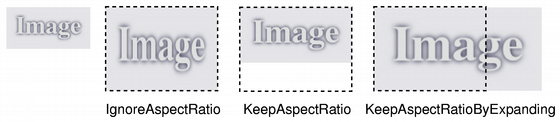
若給定 size 為空,此函數返迴 null 像素圖。
在某些情況下,把像素圖繪製到具有比例縮放設置的描繪器,比比例縮放像素圖效果更好。如:當描繪器是基於 OpenGL 的實例,或當比例縮放因子快速變化時。
這是重載函數。
返迴的像素圖副本被比例縮放到矩形采用給定 width and height 根據給定 aspectRatioMode and transformMode .
若 width 或 height 為 0 或負值,此函數返迴 null 像素圖。
返迴圖像的比例縮放副本。返迴圖像被比例縮放到給定 height 使用指定變換 mode 。 自動計算像素圖寬度,以便維持像素圖寬高比。
若 height 為 0 或負數,返迴 null 像素圖。
返迴圖像的比例縮放副本。返迴圖像被比例縮放到給定 width 使用指定變換 mode 。自動計算像素圖高度,以便維持像素圖寬高比。
若 width 為 0 或負數,返迴 null 像素圖。
此方便函數相當於調用 QPixmap::scroll( dx , dy , QRect ( x , y , width , height ), exposed ).
該函數在 Qt 4.6 引入。
另請參閱 QWidget::scroll () 和 QGraphicsItem::scroll ().
捲動區域 rect 為此像素圖按 ( dx , dy )。暴露區域保持不變。可以可選將指針傳遞給空 QRegion 以獲取區域 exposed 通過捲動操作。
QPixmap pixmap("background.png");
QRegion exposed;
pixmap.scroll(10, 10, pixmap.rect(), &exposed);
無法捲動,當像素圖中有活動描繪器時。
該函數在 Qt 4.6 引入。
另請參閱 QWidget::scroll () 和 QGraphicsItem::scroll ().
可以達成這的大多數使用情況是使用 p with QPainter and QPainter::CompositionMode 代替。
另請參閱 alphaChannel ().
設置像素圖的設備像素比率。這是圖像像素和設備無關像素之間的比率。
默認 scaleFactor 為 1.0。將它設為其它值有 2 種效果:
將比例縮放在像素圖中打開的 QPainter。例如,若采用比率 2.0,在 200x200 圖像中描繪將産生有效 (獨立於設備) 的 100x100 描繪邊界。
Qt 中基於像素圖大小計算布局幾何體的代碼路徑,會考慮比率: QSize layoutSize = pixmap. size () / pixmap. devicePixelRatio () 這的淨效果是像素圖被顯示成高 DPI (每英寸點數) 像素圖,而不是大像素圖 (見 繪製高分辨率版本的像素圖和圖像 ).
另請參閱 devicePixelRatio ().
設置遮罩位圖。
此函數閤並 mask 采用像素圖的 Alpha 通道。遮罩像素值 1 意味著像素圖的像素無變化;值 0 意味著像素透明。遮罩必須擁有如此像素圖的相同大小。
設置 null 遮罩將重置遮罩,使先前透明像素變為黑色。此函數的效果未定義,當描繪像素圖時。
警告: 這是潛在的昂貴操作。
另請參閱 mask (), 像素圖變換 ,和 QBitmap .
返迴像素圖尺寸。
另請參閱 width (), height (),和 像素圖信息 .
交換像素圖 other 與此像素圖。此操作很快且從不失敗。
該函數在 Qt 4.8 引入。
將像素圖轉換成 QImage 。返迴 null 圖像,若轉換失敗。
若像素圖擁有 1 位深度,返迴圖像也將是 1 位深。具有更多位的圖像將按底層係統所錶示的密切格式返迴。通常,這會是 QImage::Format_ARGB32_Premultiplied 對於具有 Alpha 的像素圖和 QImage::Format_RGB32 or QImage::Format_RGB16 對於沒有 Alpha 的像素圖。
注意:目前,單色圖像忽略 Alpha 遮罩。
返迴像素圖副本的變換是使用給定變換 transform 和變換 mode 。原始像素圖不改變。
變換 transform 在內部調節以補償不想要的平移;即,産生像素圖是包含原始像素圖所有變換點的最小像素圖。使用 trueMatrix () 函數能檢索用於變換像素圖的實際矩陣。
此函數很慢,因為它涉及變換到 QImage ,非通俗計算及變換迴 QPixmap .
另請參閱 trueMatrix () 和 像素圖變換 .
這是重載函數。
此方便函數加載 matrix 成 QTransform 並調用重載函數。
[static]
QTransform
QPixmap::
trueMatrix
(const
QTransform
&
matrix
,
int
width
,
int
height
)
返迴用於變換像素圖的實際矩陣采用給定 width , height and matrix .
當變換像素圖使用 transformed () 函數,變換矩陣在內部調節以補償不想要的平移,即 transformed () 返迴包含原始像素圖所有變換點的最小像素圖。此函數返迴將原始像素圖中的點,正確映射到新像素圖的修改矩陣。
另請參閱 transformed () 和 像素圖變換 .
[static]
QMatrix
QPixmap::
trueMatrix
(const
QMatrix
&
m
,
int
w
,
int
h
)
這是重載函數。
此方便函數加載矩陣 m 成 QTransform 並調用重載函數采用 QTransform 和寬度 w 和高度 h .
返迴像素圖的寬度。
將像素圖返迴為 QVariant .
返迴
true
若這是 null 像素圖;否則返迴
false
.
另請參閱 isNull ().
賦值給定 pixmap 到此像素圖並返迴此像素圖的引用。
移動賦值 other 到此 QPixmap 實例。
該函數在 Qt 5.2 引入。
寫入給定 pixmap 到給定 stream 作為 PNG 圖像。注意:將流寫入文件不會産生有效圖像文件。
另請參閱 QPixmap::save () 和 序列化 Qt 數據類型 .
讀取圖像從給定 stream 進給定 pixmap .
另請參閱 QPixmap::load () 和 序列化 Qt 數據類型 .